THE OFFICIAL UK TOP 40 SINGLES CHART
After spending a few hours finding preferable song choices, I narrowed my search down to five choices and then my final choice 'Ed Sheeran - Drunk'. I chose this song because it would be easy to incorporate slow changing shots to match the flow of the song. I also enjoyed the song at the start of my project (I can't say the same thing now after repeatedly listening to it) so thought it would be best to chose a song i liked.
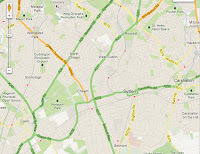
For the process of planning my storyboard, the only media technology I used was Google Maps. This was done so to find ideal filming locations nearby me.
After collecting all the footage, came the editing process. Throughout the entire process, three editing programmes were used. These were: Adobe AfterEffects CS3, iMovie, and Adobe Photoshop CS3.
The editing programme I used most was Adobe AfterEffects CS3, purely because of the fact that I was new to using it and it is quite complex. AE was used solely for making the overall video look more professional and for creating effects on certain shots, mostly to help the audience understand when a flashback is happening onscreen. I spent a lot of time just messing around with the features available, trying to get used to what I had access to. After spending over four hours, I had probably only touched about 10% of AfterEffect's resources. The effect that I repeatedly used was one to do with the colouring, Tritone. This was one of the more simplistic effects available but it made a big difference nonetheless. This is the effects i used to show when a flashback was happening, along with messing with the opacity of the core video so that the two layered each other. Overall, I was unable to fully explore the full potential of AfterEffects because there was no need. As my song choice is quite saddening and slow, I felt that any drastic changes might make the final product look less professional and quite childish.

The second editing product that I used, which I already had some minor previous experience using, was Adobe Photoshop. Photoshop wasn't used to edit any of the footage, however, it was possibly the editing programme I used the most throughout. Photoshop was used to create a lot of the advertisement products used, such as the Poster for the song release and the Album Cover. Both of these were very time consuming as a lot of editing techniques were used (too many to name) and also I tried to keep a common theme between the poster and album cover. Adobe Photoshop was also used to create the small effects on the character bios to make them seem more professionally shot.
 The final editing product, used to put together all of my footage and create simple edits, was iMovie. My previous AS media production piece was also created using iMovie, making the editing process much easier and faster as I already had a good understanding of all of the effects and how everything worked. One of the issues I found when using iMovie is that the effects that are available are few in number and I was quite restricted in this aspect. Luckily enough, my understanding of Adobe AfterEffects helped to create the required effects at a later editing stage. Another fault that I found was that the stabilisation feature can sometimes cause a jittery effect.

No comments:
Post a Comment